> ## Documentation Index
> Fetch the complete documentation index at: https://protegee.ai/docs/llms.txt
> Use this file to discover all available pages before exploring further.
# Voice API Integration
> How the flow works
**Prerequisite**: Please create an account on [Protegee](https://protegee.ai/) and visit the [settings](https://protegee.ai/settings) page to grab your `api_token` and `transfer` number.
The section you want will look something like:
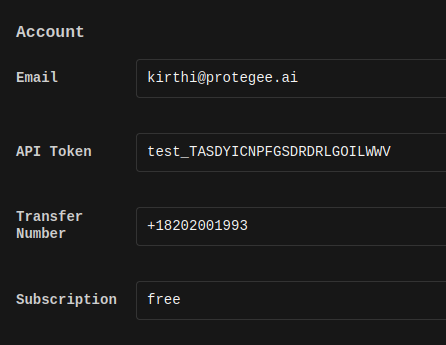 Once you have the `api_token` and the `transfer_number`, follow these instructions to get up and running:
### Control flow
Once you have the `api_token` and the `transfer_number`, follow these instructions to get up and running:
### Control flow
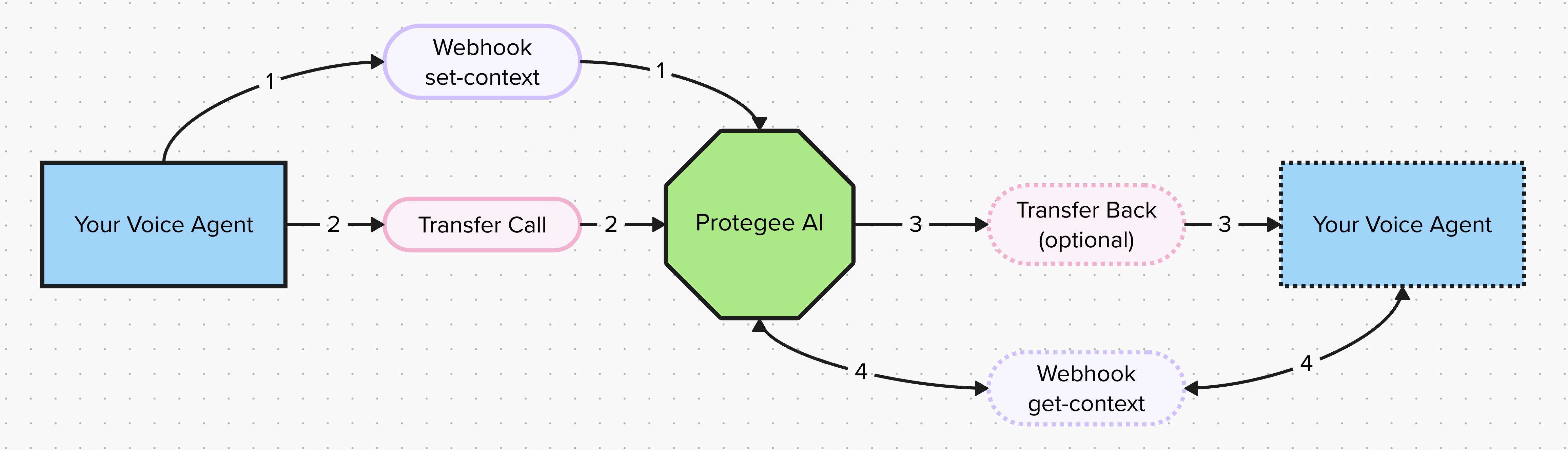 **Step 1**: Webhook set-context:
Before you can transfer the call to [Protegee](https://protegee.ai/), you need to tell it some details about the call (who the caller is, price, what are they trying to buy, etc).
An example of what this API looks like for Twilio is: [Set Context](/docs/api-reference/endpoint/set-context_twilio)
**Step 2**: Transfer to Protegee:
Exactly like it sounds, have your agent transfer the call to you.
**Step 3**: Transfer Back (optional):
There is nothing you need to do in this step. [Protegee](https://protegee.ai/) will transfer the caller back to whatever you specify in the `callback` field in the API. If it is left empty, the call is ended once payment is complete.
**Step 4**: Webhook get-context (optional)
Hitting the `get-context` endpoint will share details about how the payment processor went. To see an example of what this looks like for Twilio, check out: [Get Context](/docs/api-reference/endpoint/get-context_twilio)
**Step 1**: Webhook set-context:
Before you can transfer the call to [Protegee](https://protegee.ai/), you need to tell it some details about the call (who the caller is, price, what are they trying to buy, etc).
An example of what this API looks like for Twilio is: [Set Context](/docs/api-reference/endpoint/set-context_twilio)
**Step 2**: Transfer to Protegee:
Exactly like it sounds, have your agent transfer the call to you.
**Step 3**: Transfer Back (optional):
There is nothing you need to do in this step. [Protegee](https://protegee.ai/) will transfer the caller back to whatever you specify in the `callback` field in the API. If it is left empty, the call is ended once payment is complete.
**Step 4**: Webhook get-context (optional)
Hitting the `get-context` endpoint will share details about how the payment processor went. To see an example of what this looks like for Twilio, check out: [Get Context](/docs/api-reference/endpoint/get-context_twilio)