> ## Documentation Index
> Fetch the complete documentation index at: https://protegee.ai/docs/llms.txt
> Use this file to discover all available pages before exploring further.
# Payment Processors
> This section will show you how to quickly connect your payment processors
Feel free to skip ahead to: [API Integration](/docs/voice-api-integration). We've already added a default account called `example-co` to your account when in test mode.
## Connecting your payment processors
On protegee, you can connect as many payment providers as you like. The way they are distinguished is by specifying the `vendor` field in any requests to Protegee. To get you started, we added a test one called `example-co` that you can start using immediately.
 ### Setup
Go to [Vendors](https://protegee.ai/vendors). This is where you'll be able to see all your available vendors as well as add new ones.
### For Stripe
Connecting your vendor is as easy as sharing an onboarding link with your customers:
### Setup
Go to [Vendors](https://protegee.ai/vendors). This is where you'll be able to see all your available vendors as well as add new ones.
### For Stripe
Connecting your vendor is as easy as sharing an onboarding link with your customers:
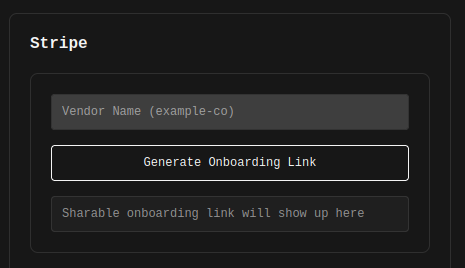 Just enter a name you'd like to use to refer to your customer. For example, if the company was called `Example Co`, name it `example-co`. If it was `Shake Shack`, name it `shake-shack`.
### For Authorize.net
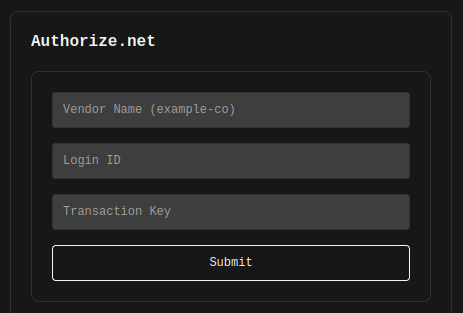
Same idea here. Obtain the `Login ID` and the `Transaction Key` from your customer, enter it here, and give it an appropriate vendor name. For example, if the company was called `Example Co`, name it `example-co`. If it was `Shake Shack`, name it `shake-shack`.
Just enter a name you'd like to use to refer to your customer. For example, if the company was called `Example Co`, name it `example-co`. If it was `Shake Shack`, name it `shake-shack`.
### For Authorize.net
Same idea here. Obtain the `Login ID` and the `Transaction Key` from your customer, enter it here, and give it an appropriate vendor name. For example, if the company was called `Example Co`, name it `example-co`. If it was `Shake Shack`, name it `shake-shack`.
 ### Coming soon
VGS, Adyen
### For any others
Send an email to [kirthi@protegee.ai](mailto:kirthi@protegee.ai) and get integration going.
### Coming soon
VGS, Adyen
### For any others
Send an email to [kirthi@protegee.ai](mailto:kirthi@protegee.ai) and get integration going.